Playing in XR
Playing in XR requires some additional configuration. Games created with the Game Creation Wizard are already configured, but you may need to adjust the XR Handles if you change the game table, so they stay in a comfortable location.
XR Handles allow players to move and rotate the game setup so it matches the position and orientation of their real-world setup.
XR Handles only appear in XR mode, but you can make them visible when playing on VR Preview by opening BP_XRPositionHandleSet in /All/Game/AOB/BoardGames/000AOB/MR and enabling the parameter Debug.
To adjust their location and rotation, open the GameSetupGeneral Data Table of your game, select the rows whose “Game Element” field is equals to “XRHandle”, and change their transform.
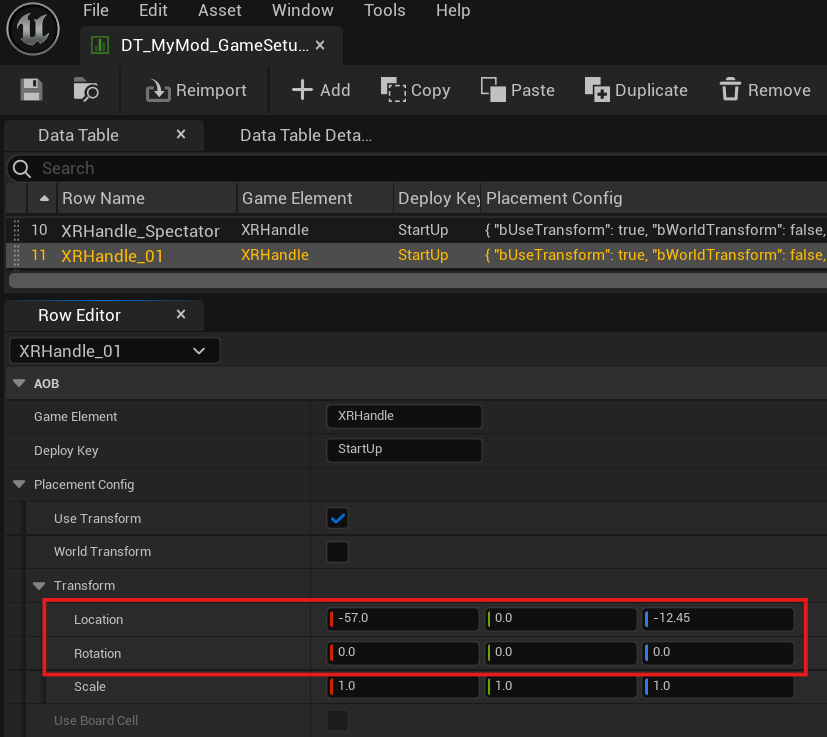
You’ll find one XRHandle for each player plus one for Spectators. To make sure which one is which, take a look at the value on the Data Entries array of each XRHandle.

All Spectators share the same location for their XRHandle, so you only need to set one for them.