Install a local mod
If you're playing on Windows, you can find your All On Board! game files through Steam.
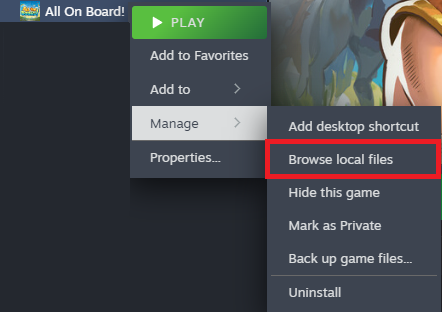
Once you've located the All On Board! folder, create a new folder named Mods inside it and place your mod folder there.
The folder path should look similar to this:
C:\Program Files (x86)\Steam\steamapps\common\All On Board!\AllOnBoard\Mods
If you're playing on Quest, create a new folder named Mods inside the AllOnBoard folder and place your mod folder there.
The mod path should look similar to this:
/Android/data/com.TheGameKitchen.AllOnBoard/files/UnrealGame/AllOnBoard/AllOnBoard/Mods/
Finally, launch the game and find your mod in the Local Mods section.
